• EN
  • NL
Support
  • Branches
    Maakindustrie
    Technologie
    Food & retail
    Automotive
    Logistiek
    Plan een kennismaking
    Start direct jouw scan
    WhatsApp direct met ons
    +31 85 130 49 35
    info@welisa.com
  • Expertise

    Onze diensten

    Audits & Scans
    Consultancy & Architectuur
    Implementatie & Uitrol
    Development & Integratie
    Managed Services & Beheer

    Onze specialisaties

    Klantprocessen & Engagement
    Integrateis & Connectiviteit
    Data & AI
    Portalen & Platformen
    Plan een kennismaking
    Start direct jouw scan
    WhatsApp direct met ons
    +31 85 130 49 35
    info@welisa.com
  • Vraagstukken

    Ik wil…

    Mijn organisatie digitaliseren
    Starten met Salesforce
    Inzicht in mijn huidige setup
    Meer uit mijn huidige team & Salesforce halen
    Mijn systemen en ERP koppelen
    Portalen voor dealers & klanten bouwen
    Schalen met Data & AI
    Salesforce laten beheren
    Plan een kennismaking
    Start direct jouw scan
    WhatsApp direct met ons
    +31 85 130 49 35
    info@welisa.com
  • Over Welisa
    Klantverhalen
    Kenniscentrum
    Onze aanpak
    Over ons
    Werken bij
    Plan een kennismaking
    Start direct jouw scan
    WhatsApp direct met ons
    +31 85 130 49 35
    info@welisa.com
  • Contact
Plan een kennismaking
Branches
Bekijk alle verzekeringen
Technologie
Food & retail
Automotive
Logistiek
Expertise

Onze diensten

Audits & Scans
Consultancy & Architectuur
Implementatie & Uitrol
Automotive
Managed Services & Beheer

Onze specialisaties

Klantprocessen & Engagement
Integraties & Connectiviteit
Data & AI
Portalen & Platformen
Vraagstukken

Ik wil…

Mijn organisatie digitaliseren
Starten met Salesforce
Inzicht in mijn huidige setup
Meer uit mijn huidige team & Salesforce halen
Mijn systemen en ERP koppelen
Portalen voor dealers & klanten bouwen
Schalen met Data & AI
Salesforce laten beheren
Over Welisa
Klantverhalen
Kenniscentrum
Onze aanpak
Over ons
Werken bij
Contact
Plan een kennismaking
Start direct jouw scan
WhatsApp direct met ons
+31 85 130 49 35
info@welisa.com
BLOG

Future-proof your automations before the end of 2025

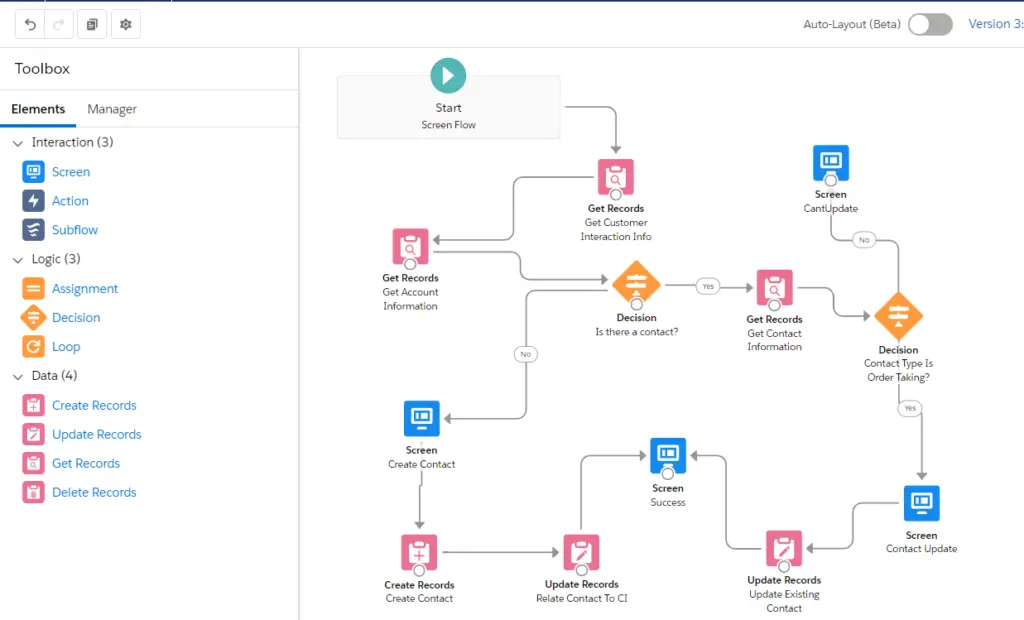
As Salesforce plans to retire both Process Builder and Workflow Rules on December 31, 2025, it is essential to migrate your automations to Flow. Here are some practical steps and recommendations to future-proof your automations:

1. Start building new automations in Flow Builder

Begin by using Flow for all new automation projects. This will not only help you become familiar with the tool but also ensure that your future automations are compatible with Salesforce’s evolving infrastructure. The sooner you start, the more time you’ll have to adapt and refine your skills with Flow. If you’re new to Flow Builder or process automation, check out the official resources Salesforce offers to get started.

2. Rebuild existing automations in Flow

Whenever an existing automation requires an update, rebuild it in Flow instead of updating it in Process Builder or Workflow Rules. This ensures that your automations are future-proof and leverage the enhanced capabilities of Flow, such as better performance and improved error handling.

3. Take advantage of new features in Flow

Flow has been enhanced to bridge the functionality gap between it and Process Builder and Workflow Rules. Features such as Scheduled Paths, subflows, and outbound messages are now supported in Flow. This provides more flexibility and improves performance. Utilize these features to enhance your automations and take full advantage of Flow’s capabilities.

4. Use the available migration tools

Salesforce provides tools and resources to assist you in migrating from Process Builder and Workflow Rules to Flow. These include the ‘Migrate to Flow’ tool and detailed guides to help you make a smooth transition. Make use of these resources to streamline the migration process and reduce the risk of errors.

You can find these tools in the Setup menu. Follow these steps to access them:

  1. Log in to Salesforce and navigate to the Setup menu.
  2. Search for ‘Migrate to Flow’ in the Quick Find box.
  3. Select the tool from the search results: Process Automation -> Migrate to Flow.

5. Optimize and clean up existing automations

Use this opportunity to review and optimize your existing automations. Identify and eliminate redundant or outdated processes to improve system performance and maintainability. This cleanup not only makes the migration easier but also enhances the overall efficiency of your Salesforce environment.

By following these recommendations, you can ensure a smooth transition from Process Builder and Workflow Rules to Flow and position your organization to benefit from the advanced features and improved performance of Salesforce’s unified automation tool.

In this blog

  • 1. Start building new automations in Flow Builder
  • 2. Rebuild existing automations in Flow
  • 3. Take advantage of new features in Flow
  • 4. Use the available migration tools
  • 5. Optimize and clean up existing automations

Ander interessant nieuws

Related interesting news

MuleSoft LTS: from technical update to the nervous system of your AI strategy


Logo van MuleSoft op een donkerblauwe achtergrond.

Salesforce Spring ’26 highlights: selected by our experts

Sanne met naast haar te tekst 'Spring'26 release' samen met het logo van Salesforce en Welisa

Important Update: New Usage Policies for Salesforce Connected Apps

Cyber security: digitaal slot
Portretfoto Riekus

In need of some help?

Contact

Contactinformatie

Citadel 28-3
3905 NK Veenendaal

+31 85 130 49 35
info@welisa.com

KVK 74430513

BTW NL859895361B01

Onze diensten

Audits & Scans
Consultancy & Architectuur
Implementatie & Uitrol
Development & Integratie
Managed Services & Beheer

Onze specialisaties

Klantprocessen & Engagement
Integrateis & Connectiviteit
Data & AI
Portalen & Platformen

Branches

Maakindustrie
Technologie
Food & Retail
Automotive
Logistiek

Bedrijf

Klantcases
Nieuws en blogs
Werken bij
Over ons
Contact
Practical Updates for Salesforce Admins Regarding the Salesforce Summer ’24... Is your org ready for the migration to Hyperforce?
Scroll to top